

|
||||
|
|
||||
|
||||
|
Crime Rates in your Area, and How to Find Them! |
||||
How to Use the West Midlands Police Website to Find Crime Rates in Your Area
Good evening Resident, We have recently had a few messages regarding crime rates across the Wolverhampton area and I would like to take the opportunity to tell you how you can check for yourselves. Please take in to consideration that statistics will not be fully up to date at your time of reading, as we have to make sure we are collating everything correctly on our end before we make statistics available to the public.
If you want to understand crime levels where you live, work, or are considering moving, the West Midlands Police website provides a simple way to access local crime data. By using the crime map and neighbourhood information tools, residents can view recent crime statistics, identify trends, and learn more about policing activity in their community.
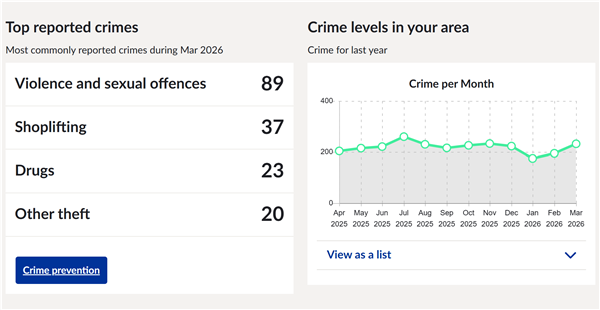
Step 1: Visit the West Midlands Police Website Start by visiting the West Midlands Police website. On the homepage, you will find a section titled “What’s happening in your area?” where you can search using your postcode, street name, or current location. This tool helps you find your local neighbourhood policing team and access crime information specific to your area. Step 2: Find Your Neighbourhood Enter your postcode or address into the search box and select your neighbourhood. Each neighbourhood page contains information about local officers, community priorities, and recent crime data. The pages are designed to help residents understand the issues affecting their area and what police are doing to address them. Step 3: Open the Crime Map Within your neighbourhood page, navigate to the “Crime Map” section. The interactive map displays recorded crimes in the area and allows users to explore incidents geographically. The map shows approximate locations rather than exact addresses to protect the privacy of victims and those involved in incidents. Step 4: Filter Crime Data The crime map includes filtering options that allow you to: Select specific crime types. View data for different months. Focus on particular locations within your neighbourhood. These filters can help you identify patterns such as increases in vehicle crime, antisocial behaviour, or theft in certain areas. Step 5: Interpret the Results Crime data is typically displayed as the number of incidents recorded in a particular location during the selected period. Hotspots on the map indicate areas where multiple incidents have been reported. It is important to remember that the locations shown are intentionally approximate and should be used to understand general patterns rather than pinpoint exact crime scenes.
^^ABOVE EXAMPLE TAKEN FROM WOLVERHAMPTON CITY CENTRE^^ Understanding the LimitationsWhile the crime map is a useful resource, it does not show every reported crime. Some incidents cannot be mapped, and all locations are anonymised to protect privacy. The data should therefore be viewed as an overview of local crime trends rather than a complete picture of every offence committed in the area.
Why Use Local Crime Data?Checking crime statistics can help residents: Stay informed about issues affecting their neighbourhood. Understand local policing priorities. Make informed decisions when moving home. Support community safety initiatives. Monitor changes in crime levels over time. By regularly reviewing the crime map and neighbourhood updates, residents can gain a better understanding of local safety issues and the work being carried out by West Midlands Police to keep communities safe.
Final Thoughts The West Midlands Police website offers a straightforward way to access crime information for your neighbourhood. By searching for your area, opening the crime map, and using the available filters, you can quickly find recent crime statistics and identify trends that matter to your community. Regularly checking this information can help you stay informed and engaged with local policing and community safety efforts.
Click HERE to head to the West Midlands Police website. | ||||
Reply to this message | ||||
|



|
