

|
||
|
|
||
|
||
|
Too many messages? How to change who you hear from on Hampshire Alert. |
||
|
Good Evening Resident
If you find this information helpful, please “rate” this message at the bottom (very quick and simple).
I saw a comment recently on a post of mine om Facebook that someone had removed themselves from Hampshire Alert due to getting too many messages. This is a real shame as anyone can reduce the information providers they hear from.
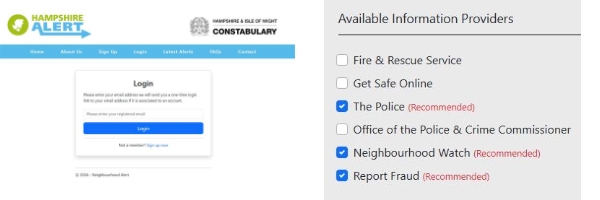
There are a total of 6 information providers you can sign up too. The default setting is 3, these are – The Police Neighbourhood Watch Report Fraud
But you can also hear from - Fire & Rescue Service. Get Safe Online. Office of the Police & Crime Commissioner. If you feel you are getting too many messages, please login to your Hampshire Alert account and adjust your settings to reduce who you hear from. Alternatively you can also add information providers if you wish to.
It a real shame to loose anyone from this system as we often use it to reach residents with relevant messages on a very local level – sometimes just your road! And if you are not registered you won’t get the message from us and the excellent crime prevention information we share.
Please help us to reach more residents. Tell your neighbours, friends & family about Hampshire Alert - anyone can register - https://www.hampshirealert.co.uk/
Hedge End Neighbourhood Policing Team. PCSO Mica Woodcock 12948 - West End PCSO 👮🚲👍😊
| ||
Reply to this message | ||
|

|
